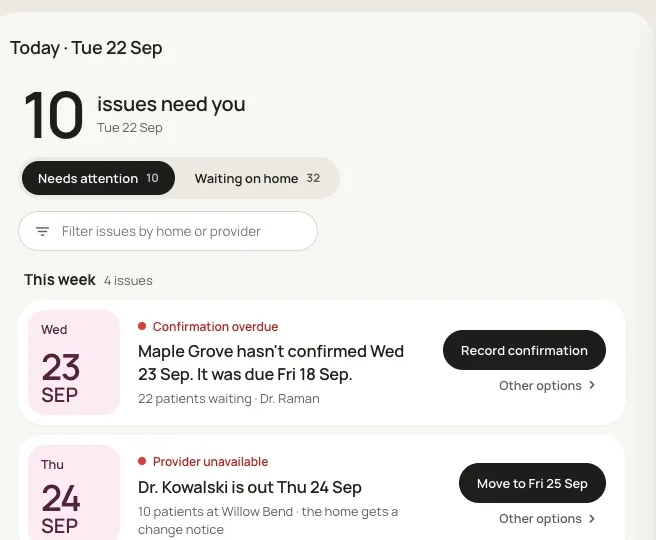
01 / Issues queue
Issues that need a scheduler
Call-outs, overdue confirmations, double-bookings and broken home rules, each paired with a one-click fix.
A clickable prototype that lets schedulers stop building calendars by hand and focus on the issues that need a human.
The problem
Schedulers at a healthcare company serving senior living communities booked about 1,500 visits a week by hand. It was slow, error-prone, and left little time for urgent changes.
What I did
As researcher and lead designer, I ran six discovery interviews and turned them into a working prototype in 48 hours using Claude Code.
The result
The pitch won the Phase 1 engagement, and the client expanded the scope beyond the original agreement.
01 / CONTEXT
The client, a large healthcare company, approached Caylent about a scheduling calendar that could expedite the scheduling team's workflow by automating tasks. The company specializes in sending vision, audiology, dental and podiatry providers into senior living homes across the country. Its 70–80 schedulers booked about 1,500 visits a week and that volume was expected to double or triple within three years.
The goal of this discovery phase was a clickable prototype that proved we understood the problem and proposed new solutions. It wasn't the final product. It gave stakeholders on both sides a shared picture of the end goal and a starting point for scoping the engagement that would build it.
Our project experienced scheduling delays along the way, and the week and a half planned to build the prototype shrank to 48 hours.
02 / DISCOVERY
Six one-on-one interviews with schedulers and stakeholders, walking through how each of them works and what worried them.
Schedulers match a provider to a home, then fill the visit with patients who are due.
Step 1 · Match a provider to a home
Credentialing, rotation, drive limits and one service line per day decide who goes where.
Step 2 · Fill the visit with patients
Patients who are due are added up to the provider's capacity, following state visit windows and coverage.
Below is a list of the seven rules and considerations we identified that go into booking a provider with a home, each one a constraint the new system would need to enforce automatically.
Credentialing
A provider has to be credentialed at a home before they can visit it.
Rotating coverage
Providers cycle through the homes in their region. Some homes are remote enough that providers fly in.
One service line per home per day
Homes don't have room for two. If audiology is there Tuesday, dental can't be.
Patient capacity
Each provider has a max patient count, weighted by appointment type.
Patient coverage
Some patients are covered through the client and some aren't, and that's weighed when filling a list.
State laws
State laws set how often a provider has to see each patient and visit each home, typically every 30 or 60 days.
Drive limits
Providers can only drive so far in a day, and shorter is always better.
One scheduler told us it took 17 clicks to book a single patient.
Where automation existed, it was years old, with rules layered on until nobody knew how it made decisions. Schedulers overrode it more than they trusted it, and every override meant rebuilding the visit by hand.
Three insights shaped the design:
Insight 01
Same-day and next-day changes take up most of the scheduler's day.
Call-outs and cancellations arrive last minute and preoccupy schedulers, so they need to be able to act on them quickly.
Insight 02
Each booking has to account for state laws and provider and home preferences.
New schedulers took significantly longer than tenured ones, who carried the rules in their heads.
Insight 03 · the key
Schedulers didn't trust the automation.
Past attempts created so much rework that schedulers double-checked everything it produced. Any new system had to earn that trust back.
03 / APPROACH
Booking was the small part of the job. Most of the day went to spotting conflicts, chasing cancellations and fixing what the old automation got wrong. So we reversed the roles: the system builds the calendar 14–21 days out while adhering to every known and documented rule, and the scheduler handles the exceptions.
Automation handles
The repetitive checklist work
Schedulers handle
The calls that need a human
Step 1 · Requirements
6 interviews, 1 spec
Rules, edge cases and preferences in one doc.
Step 2 · Claude Code
First draft in HTML
Generated from the spec. It got us 75–80% of the way there.
Step 3 · Design pass
The last 20%
I refined the UI and kept iterating until we presented.
04 / SOLUTION
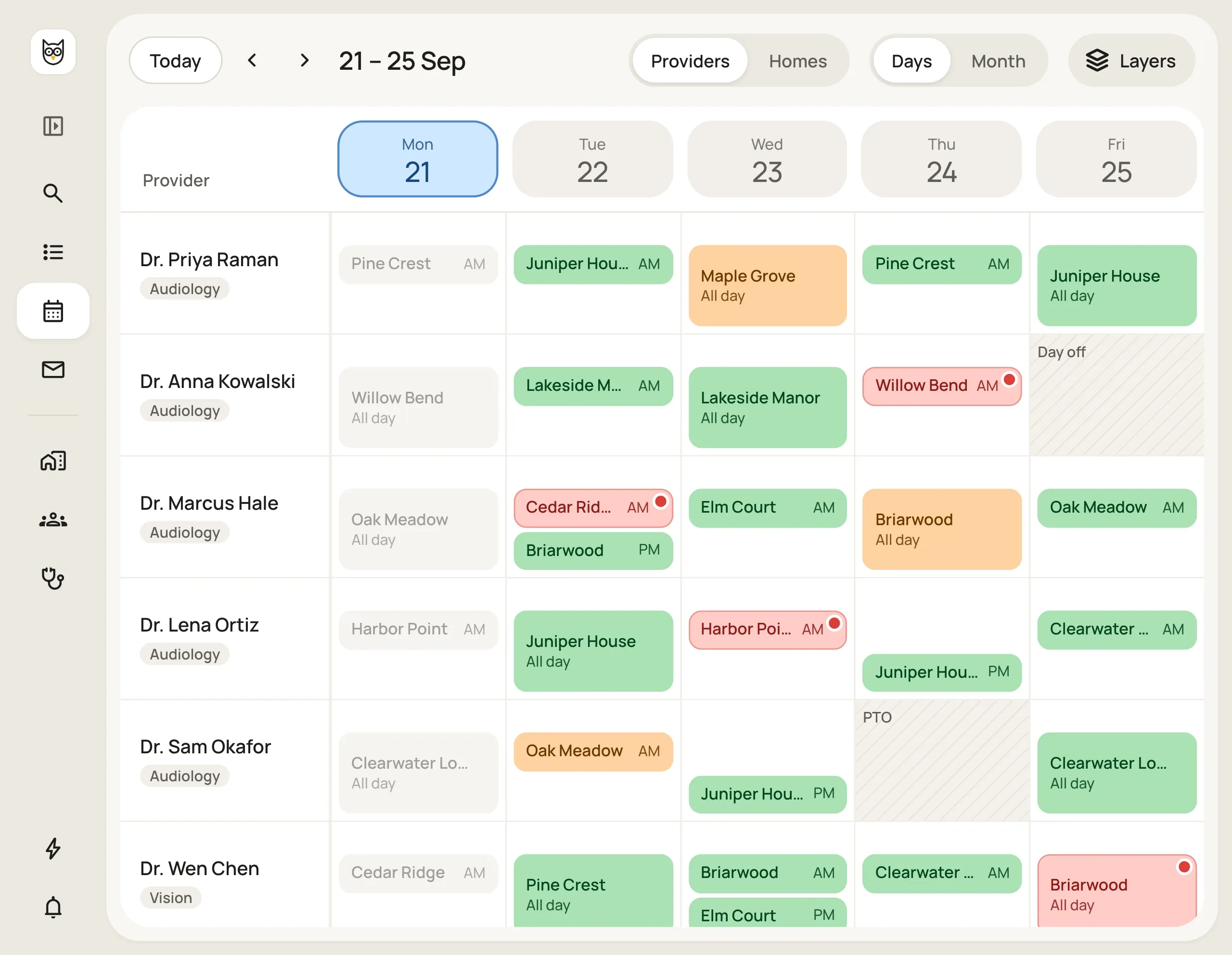
Instead of landing on a calendar, schedulers start each day on a list of the problems the automation can't solve alone. The prototype has three core screens: the issues queue, a shared calendar across all four service lines, and a visit panel for making changes safely. Each one exists to help schedulers resolve issues quickly and with confidence.
01 / Issues queue
Call-outs, overdue confirmations, double-bookings and broken home rules, each paired with a one-click fix.
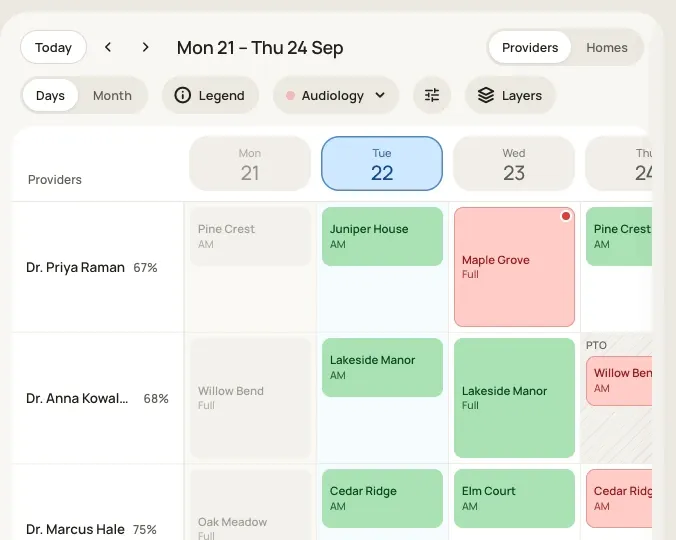
02 / Calendar
Edit one service line while seeing all four. Drag a visit to a new day or provider instead of deleting and rebuilding it.
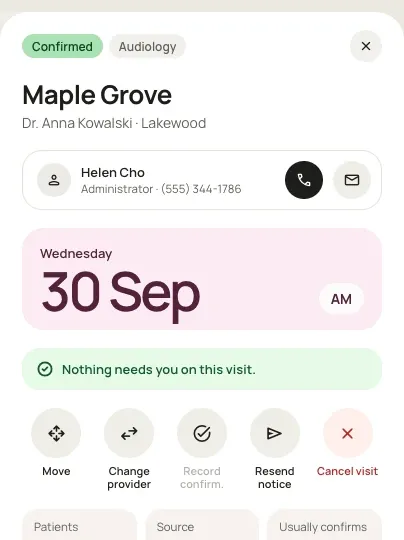
03 / Visit panel
Move, reassign, confirm or cancel a visit and see what else it affects.
Every scheduling issue surfaced to schedulers came with a recommended fix.
The logic behind the calendar automation was documented so schedulers can understand why the automation made every decision.
The calendar automation schedules around provider preferences and drive time.
| Before | After | |
|---|---|---|
| Building the schedule | By hand on paper, or automation that needed constant correction | Automated, rolling 14–21 days out |
| Checking the rules | Memory, paper and Salesforce | Applied automatically to every scheduled visit |
| Identifying scheduling problems | A phone call, or generic error messages after each run | Flagged days ahead, each with a fix |
| Changing an existing provider or home visit | Delete the visit, rebuild it, and re-add the provider and home | Drag and drop, or a one-click fix |
05 / IMPACT AND RESULTS
The new calendar doesn't replace schedulers. It gives them back the part of the job that needs a human.
The client asked us for a better calendar to help schedulers get more done. But what schedulers really needed was more time for fewer, more important tasks. They were stretched thin, pairing providers with homes and booking thousands of patients while handling last-minute changes.
We automated the busy work of matching providers to homes and confirming availability. That freed schedulers to focus on what matters most: same-day and next-day appointment changes, plus any other scheduling issues that come up.
Business outcome
Won the Phase 1 engagement, with scope expanded beyond the original agreement.